Use a Beetle as an MQTT broker
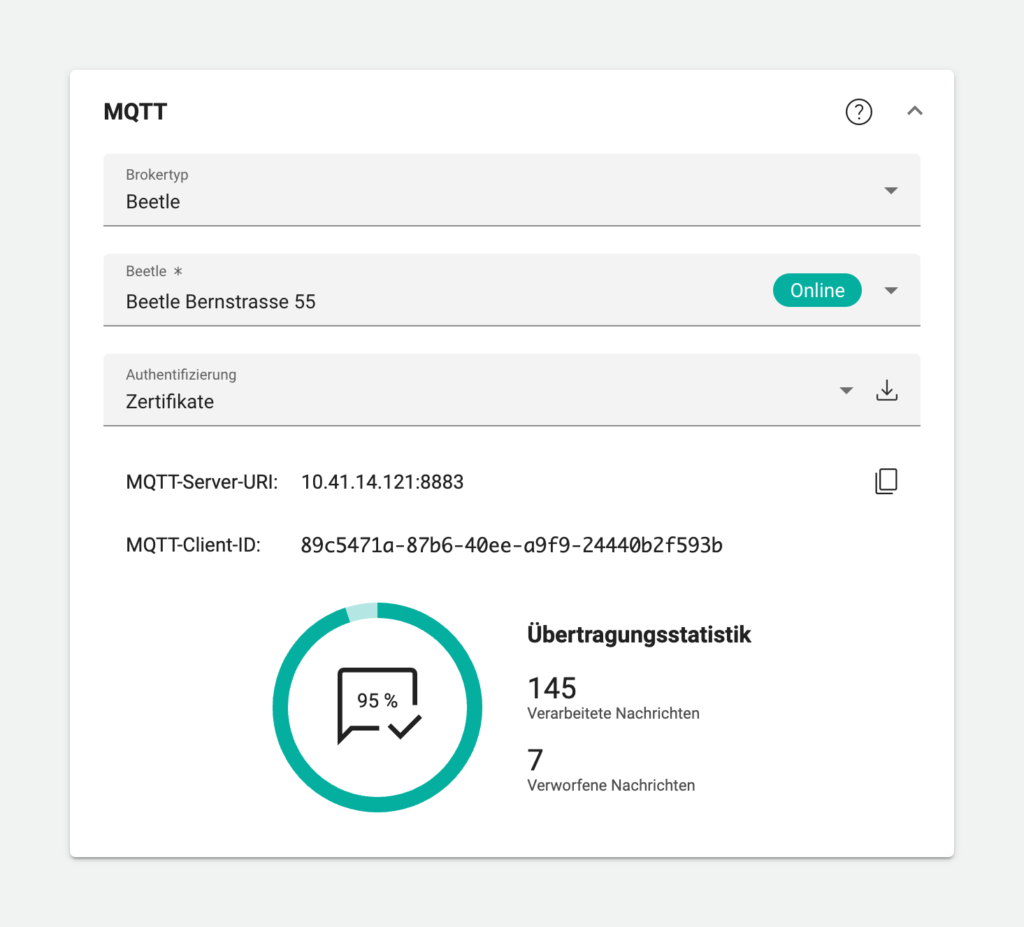
You can now use a Beetle as the MQTT broker of your MQTT-based IoT devices. This allows you to create surrogate BACnet objects, which bridge the sensors of your IoT device with BACnet or Modbus.
S7 communication protocol (RFC 1006)
We’ve added support for Siemens’ S7 communication protocol. Set up your controllers, modules and objects in the user interface and use them as data points in Avelon Cloud by reconciling those objects. Reconciliation will push the configuration to the Beetle and allow it to act as a mediator between S7 controllers and Avelon Cloud.
Shape editor and schematic faceplate
We’ve added several improvements in the shape editor – most of which are related to the faceplate:
- On each shape type, you can now configure whether the schematic faceplate should be opened when the shape is clicked on a schematic.
- Individual data point properties can be hidden from the compact view of the schematic faceplate.
- With a new action right, access to the faceplate can be limited to the compact view, so that only privileged users can switch to the extended view.
- Shape groups can now be flagged as deprecated, which in turn will automatically flag all shape types inside the group as deprecated as well.
These changes are described in detail in the user manual.
We’ve also added a new action to the shape behavior that increments or decrements the current value of a data point property with a pre-defined offset. This allows you to implement simple increment and decrement buttons. See user manual.
We’ve also added some settings on the Beetle user interface that you can use to tweak the connection to your OPC UA server.
Organize your support hours by project
Support hours that you purchase to request support can now be assigned to individual support groups, which lets you allocate them to specific projects or real estates within your client account.
More information about managing your support hours can be found in the user manual.
Avelon Connect: Support for Alcedo Inhouse and WAGO controllers
With Avelon Connect, it is now possible to connect to Alcedo Inhouse systems and WAGO controllers via VPN.
Important announcements
License enforcement
With the upcoming version 7.36 of Avelon Cloud, the following license restrictions will be enforced:
- Free use of the document management is now limited to 100 MB per client. For clients with existing subscriptions, the free storage space increases to 1 GB. A Document Management license is required for additional storage space.
- When using the Avelon Meters app, the system will now check that a valid Avelon Meters license has been purchased.
To purchase a license, please contact our sales team.
Discontinuation of Avelon Share
The Avelon Share application for Windows will be discontinued in version 7.36. Users should uninstall the application and use the document management on our regular web interface to access and manage their documents.
Changes in the public API
Also note that we’ve changed some endpoints in our public API.
Please update your existing integrations accordingly, as the old endpoints will be removed in a future version of Avelon Cloud.
Affected features are
- retrieving data via GraphQL over WebSockets
- acknowledging and closing tickets
A list of all changes can be found in the section Deprecated in our Public API documentation.
Bug fixes and improvements
- Document management now shows PDF documents within a thumbnail preview when they’re displayed as tiles or when they’re selected from the table view.
- On all Wisely devices you can now configure an offset to calibrate the temperature sensor. This feature is for compliance only. We don’t encourage to set offsets, since the sensors are completely digital themselves. They are checked at the factory and thus are very accurate.
- Logins via the public API are now logged as separate types in the logbook and can be filtered as such. This keeps the logbook well organized.